SCCM Boundary Groups and Peer Cache: Content Guide · CloudEngineerHub
SCCM / MECM9 min read1 views
SCCM Boundary Groups and Peer Cache: Fixing Slow Content Distribution for Good
Boundary group design, fallback timing, peer cache vs BranchCache and content library cleanup — stop slow SCCM content distribution for good.
C
CloudEngineerHub Team
Published: August 27, 2026· Last Updated: September 28, 2026·9 min read
SCCM Boundary Groups and Peer Cache: Fixing Slow Content Distribution for Good
The pattern is always the same: branch office of 40 users, one WAN link, and a Monday driver deployment that takes nine hours because every device pulls from a data center 400 km away while sitting three meters from a fully cached neighbor. Content delivery problems are almost never package problems — they are boundary group design problems. Get the group topology, fallback timing, and peer-sharing model right once, and every future deployment inherits the benefit. This guide covers the design rules, fallback behavior, peer cache versus BranchCache versus Delivery Optimization, how to watch downloads in real time, and how to clean up the content library without breaking production.
Visual Walkthrough
C
CloudEngineerHub Team
Author
The CloudEngineerHub editorial team — Microsoft endpoint management and cloud engineers writing hands-on guides on Intune, Azure, Entra ID, Autopilot, Defender and PowerShell. Every article is reviewed against current Microsoft documentation.
Boundary groups, peer cache and fallback explain every slow download.
Interactive FlowSCCM Content — Package to Client Download6/6
1
Source distributed
Package pushed to DP groups; distribution status watched.
map
2
Boundary groups map
Client's IP boundary → DPs, with fallback timing configured.
fallback
3
Neighbor & site fallback
Neighbor DPs after X minutes; site fallback last resort.
peer
4
Peer cache serves
Peer sources answer first where enabled — LAN-speed wins.
download
5
BITS downloads
Client pulls content with throttling + branch cache options.
6
Content verified
Hash check passes; app/ts proceeds.
SCCM Content — Package to Client Download. 1. Source distributed: Package pushed to DP groups; distribution status watched. — 2. Boundary groups map: Client's IP boundary → DPs, with fallback timing configured. — 3. Neighbor & site fallback: Neighbor DPs after X minutes; site fallback last resort. — 4. Peer cache serves: Peer sources answer first where enabled — LAN-speed wins. — 5. BITS downloads: Client pulls content with throttling + branch cache options. — 6. Content verified: Hash check passes; app/ts proceeds.
Prerequisites
ConfigMgr current branch with console access and read/write on boundaries and boundary groups.
Site server log access for DP-side checks; client access to C:\Windows\CCM\Logs for source-selection forensics.
For peer cache: client devices running a supported ConfigMgr client, in full OS (peer cache does not serve from WinPE), with the client settings option to share content enabled.
Content Library Explorer (from the installation media's SMSSETUP\TOOLS folder) for library cleanup work.
A baseline throughput measurement method (robocopy or a scripted download) for before/after comparisons.
Boundary Group Design Rules That Prevent 90% of Pain
Boundary groups are the only mechanism by which clients discover content sources, management points, and software update points. The design rules are few but absolute:
Pick the right boundary type per site. IP ranges for sites without clean subnetting, IP subnets where DHCP is tidy, AD sites only when the AD topology is actually maintained (stale AD sites poison boundaries silently). Avoid mixing types across overlapping areas.
One boundary, one boundary group. Overlapping boundary group membership is the leading cause of "why did it pick that DP" mysteries. A device should belong to exactly one group; use neighbor relationships for secondary paths.
Put site systems in the group. DPs, MPs, and SUPs are added to boundary groups directly — a DP that exists but is in no group is invisible to content queries.
Model the network, not the org chart. Boundary groups map to physical network islands; "Marketing Europe" is not a boundary group unless Marketing has its own WAN link.
Field note: The best boundary group documentation is a diagram on the wall next to the network team's own WAN diagram. When the two disagree, one of them is lying — and content downloads will tell you which.
Fallback Timing: The Setting Everyone Sets Wrong
Within a boundary group, clients prefer DPs in their own group. When those are slow or unavailable, neighbor groups apply in the order and delay you configure; finally, the site default group's fallback applies after 120 minutes by default. The knobs:
Neighbor group fallback time (minutes): For each neighbor relationship, the time after which its DPs become eligible. A sensible ladder: immediate neighbors at 30–60 minutes, regional at 120, everything else never (0 = never for content).
Never fall back for DPs serving content that must stay in-region (licensing, bandwidth contracts) — set 0 and sleep well.
Task sequence deployments: The deployment option "allow fallback source locations for content" overrides group fallback for that TS — check it for OSD when DPs are uneven, but know it's per-deployment.
Software update points fall back on their own timers; content and SUP fallback are separate conversations that admins routinely conflate.
Design the ladder
Design the ladder deliberately: current group → nearby group (30 min) → regional (120 min) → nothing. The 120-minute site default is a safety net, not a strategy; treat fleets that regularly exercise it as a capacity-planning alarm.
Peer Cache vs BranchCache vs Delivery Optimization
Three peer-sharing systems, three layers, one job. Choosing wrong wastes weeks:
Peer cache
BranchCache
Delivery Optimization
Managed by
ConfigMgr client settings
ConfigMgr + Windows BranchCache service
Windows (OS-level)
Scope
Same boundary group
Same subnet (distributed mode)
Same subnet / LAN, cloud fallback
Works for
ConfigMgr content
BITS/HTTP/SMB content
WUfB/Store/DO-enabled content
Visibility
CM logs track peer usage
BranchCache counters, CCM logs
DO logs/PS cmdlets
Best for
CM app/package delivery on LANs
File share + legacy BITS scenarios
Windows Update-driven fleets
For ConfigMgr content on well-connected office LANs, peer cache is the native answer: clients that already downloaded content serve it to boundary-group peers. Enable it in Client Settings (the peer-sharing option and, if needed, the custom port — default 8003), and remember the practical constraints: peers serve only in full OS, the source must have the content and be reachable, and the client's cache age settings control how long it can serve. Delivery Optimization, meanwhile, governs WUfB content — if your feature updates flow through Intune/WUfB, DO tuning matters more than peer cache for those bytes.
Verify peers are serving
From the requester's perspective, two checks close most peer questions:
PowerShell
1
2
3
4
# Is a peer listening on the peer cache port (default 8003)?
Test-NetConnection -ComputerName PC-LT-0142 -Port8003 -InformationLevel Quiet
# BranchCache service state on the client itself
Get-Service PeerDistSvc | Select-Object Status, StartType
Watching a Download in Real Time
When a device downloads slowly, the client logs tell you exactly which source it chose and why. The chain: LocationServices.log (which DPs/groups it knows), ContentTransferManager.log (which source and job), DataTransferService.log (the actual transfer), CAS.log (content access decisions). A healthy peer-assisted download shows the peer source explicitly in CTM/DTS lines; a "DP only" pattern on a LAN with cached peers means the peer settings are not applied or the peers are offline.
PowerShell
1
2
3
4
5
6
7
# Which sources did the client consider and pick in the last hour?
Get-Content C:\Windows\CCM\Logs\ContentTransferManager.log -Tail200 |
Select-String -Pattern"CTM job|Source|location" | Select-Object -Last12# Cache state: what is occupying ccmcache right now
Get-ChildItem C:\Windows\ccmcache | Measure-Object -Property Length -Sum |
Select-Object Count, @{n='GB';e={[math]::Round($_.Sum/1GB,2)}}
Measure, don't guess
Measure throughput honestly: baseline a controlled copy from the DP share versus a peer before and after changes — robocopy \\dp01.contoso.com\SMS_DP$\<pkgfolder> C:\temp\test /njh style timings give you numbers you can put in a change ticket. Feelings are not baselines.
Field note: Slow deployments in one building with a healthy DP are usually not bandwidth — they are a client resolving to a far DP because its boundary maps to the wrong subnet (VPN adapters and stale AD sites are the repeat offenders). Fix the boundary, not the link.
Visual Walkthrough
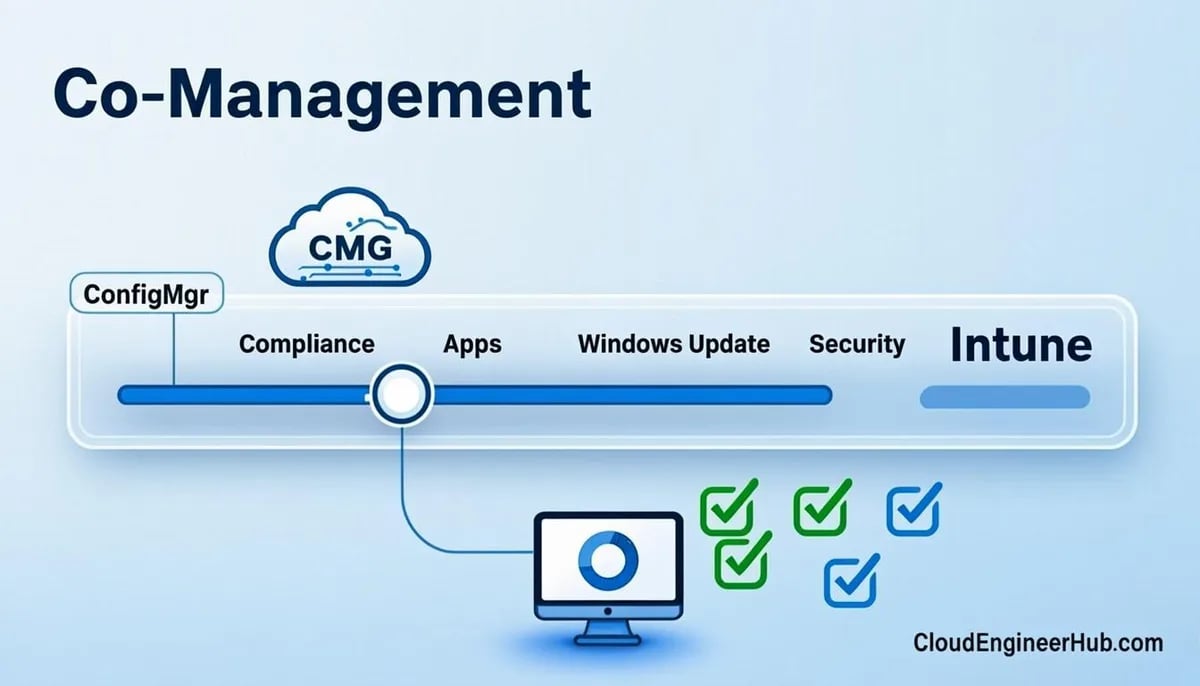
Switch authority one workload at a time; keep a rollback for each.
Lifecycle LoopCo-Management — Workload by Workload6/6
Compliance policies first — least invasive, fastest feedback.
switch 2
3
Switch device config
Intune becomes authority for configuration profiles.
switch 3
4
Switch updates & endpoint security
WUfB + Defender policies move under Intune authority.
switch 4
5
Switch apps & Office
Win32 + Click-to-Run complete the migration surface.
6
Steady state
Both consoles live; reports show which authority owns what.
Continuous cycle
Co-Management — Workload by Workload. 1. Enable co-management: SCCM agent + Entra hybrid identity + license verified. — 2. Pilot workloads: Compliance policies first — least invasive, fastest feedback. — 3. Switch device config: Intune becomes authority for configuration profiles. — 4. Switch updates & endpoint security: WUfB + Defender policies move under Intune authority. — 5. Switch apps & Office: Win32 + Click-to-Run complete the migration surface. — 6. Steady state: Both consoles live; reports show which authority owns what.
Content Library Cleanup Without Breaking Production
Every DP accumulates orphans: content removed from packages that still occupies the library, packages whose source folder moved, disk usage that no console report fully explains. The supported tools:
Content Library Explorer (from SMSSETUP\TOOLS\ContentLibraryExplorer on the installation media): view the library's actual contents, compare against packages, and delete orphaned content safely. It is deliberately read-only about what it does not understand — respect that.
Redistribute/validate: For corrupted or partial content, console-level Validate and Redistribute beats deleting files by hand; hash validation is the repair mechanism Windows-level tools can't replicate.
Cache hygiene on clients: Configure client cache size and retention in Client Settings (Cache group) — fleets that never tune this end up with peers that evicted the very content they were supposed to serve.
Moving the library to a new disk is the Content Library Transfer Tool's job, not robocopy's — the library is a database of references, not a folder of files.
Cleanup cadence: quarterly per DP is enough for most estates; after big application retirements, run it immediately. Document what was removed — an unexplained 400 GB dip looks like an incident until it is a line in a change log.
Testing Throughput After Changes
Validate boundary/peer changes with a repeatable test: pick one package, clear cache on two test clients (one wired to the DP's subnet, one in the target branch), force a download, and record duration and source (CTM log). Then run the same test through the new topology. Numbers to aim for as sanity anchors: a gigabit LAN peer-to-peer copy should outrun WAN pulls by an order of magnitude; if branch clients still select the far DP, the boundary group or the client's network location detection is wrong — re-check boundaries with Get-CMBoundary and the client's actual IP (VPN adapters frequently claim priority).
Key takeaways
One boundary per boundary group, no overlaps; put DPs, MPs, and SUPs in the groups explicitly or clients will not find them.
Fallback is a ladder you design: neighbors at 30–60 minutes, regional at 120, never for content that must stay in-region — and remember task sequences can override fallback per deployment.
Peer cache serves ConfigMgr content within boundary groups (default port 8003, full OS only); BranchCache covers BITS/SMB patterns; Delivery Optimization owns WUfB content — pick per content type, not per fashion.
Diagnose source selection with LocationServices.log → ContentTransferManager.log → DataTransferService.log/CAS.log; the chosen source and reason are always in there.
Wrong-DP problems are usually boundary problems (VPN adapters, stale AD sites), not bandwidth problems — verify with Get-CMBoundary and the client's real IP.
Clean the content library with Content Library Explorer on a quarterly cadence and after app retirements; never hand-delete library files.
Baseline throughput with controlled robocopy/download tests before and after every topology change; put numbers in the change ticket.
Frequently asked questions
Should I use IP ranges or IP subnets for branch boundaries?
IP ranges when the branch's address space is contiguous but not cleanly subnetted (common after years of DHCP growth); subnets when DHCP is disciplined. Never use AD sites unless someone actually maintains the AD topology — stale sites cause silent wrong-DP behavior that takes weeks to diagnose.
Why do clients ignore peer cache and go straight to the DP?
Usually one of: peer cache not enabled in the applied client settings, peers lack the content (evicted or never downloaded), peers are in full-OS sleep or off, or the peers are in a different boundary group than the requester. The CTM/DTS logs will show whether a peer was even evaluated — start there.
Does fallback to a neighbor DP re-download partial content?
The transfer engine resumes rather than restarts where the protocol allows, but switching sources mid-download can re-fetch some data. The bigger cost of over-frequent fallback is instability, not bytes — design fallback timers so the ladder is exercised rarely and on purpose.



Comments
0No comments yet — be the first to share your thoughts.