Azure Monitor Alerts and Automation: Complete Setup Guide · CloudEngineerHub
Azure12 min read16 views
Azure Monitor Alerts and Automation: Complete Setup Guide
Build a production-grade alerting stack on Azure Monitor: metric, log, and activity-log alerts; action groups; severity models that stop fatigue; and the Az PowerShell to deploy it all.
C
CloudEngineerHub Team
Published: July 13, 2026· Last Updated: September 24, 2026·12 min read
Azure Monitor Alerts and Automation: Complete Setup Guide
The difference between a cloud team that sleeps and one that doesn't is a well-shaped alerting stack: the right signals, routed to the right people, with severities that mean something. Azure Monitor gives you three alert families — metric, log (scheduled query), and activity log — plus action groups and processing rules to route them. Deployed carelessly, it becomes a noise machine nobody reads. Deployed with the framework in this guide, it catches outages before customers do and pages humans only when a human is genuinely needed.
Visual Walkthrough
From KQL query to on-call notification with automation on the tail.
C
CloudEngineerHub Team
Author
The CloudEngineerHub editorial team — Microsoft endpoint management and cloud engineers writing hands-on guides on Intune, Azure, Entra ID, Autopilot, Defender and PowerShell. Every article is reviewed against current Microsoft documentation.
Interactive FlowAzure Monitor Alerts — Signal to Action6/6
1
Telemetry ingested
Metrics and logs stream into Log Analytics workspace.
query
2
KQL shapes the signal
Query filters noise, aggregates by resource and threshold.
evaluate
3
Alert rule evaluates
Scheduled evaluation with stateful firing (fired/resolved).
notify
4
Action group fires
Email, SMS, webhook, ITSM — one group, many channels.
remediate
5
Automation responds
Logic App / runbook remediates or gathers diagnostics.
6
Closed with evidence
Alert history + job output stored for the RCA.
Azure Monitor Alerts — Signal to Action. 1. Telemetry ingested: Metrics and logs stream into Log Analytics workspace. — 2. KQL shapes the signal: Query filters noise, aggregates by resource and threshold. — 3. Alert rule evaluates: Scheduled evaluation with stateful firing (fired/resolved). — 4. Action group fires: Email, SMS, webhook, ITSM — one group, many channels. — 5. Automation responds: Logic App / runbook remediates or gathers diagnostics. — 6. Closed with evidence: Alert history + job output stored for the RCA.
Prerequisites
Az PowerShell module (Install-Module Az — alerts need Az.Monitor), Contributor or Monitoring Contributor on the target resource group(s).
A Log Analytics workspace for log-based alerts (see our Azure Monitor workspace guide) with diagnostic settings flowing from your resources.
An Action Group design decided up front: who gets emailed, which Logic App runs, which ITSM webhook fires.
Consent on the alert philosophy: every alert must map to an action. "Informational" alerts that page nobody are dashboards, not alerts.
How It Works: The Three Alert Families
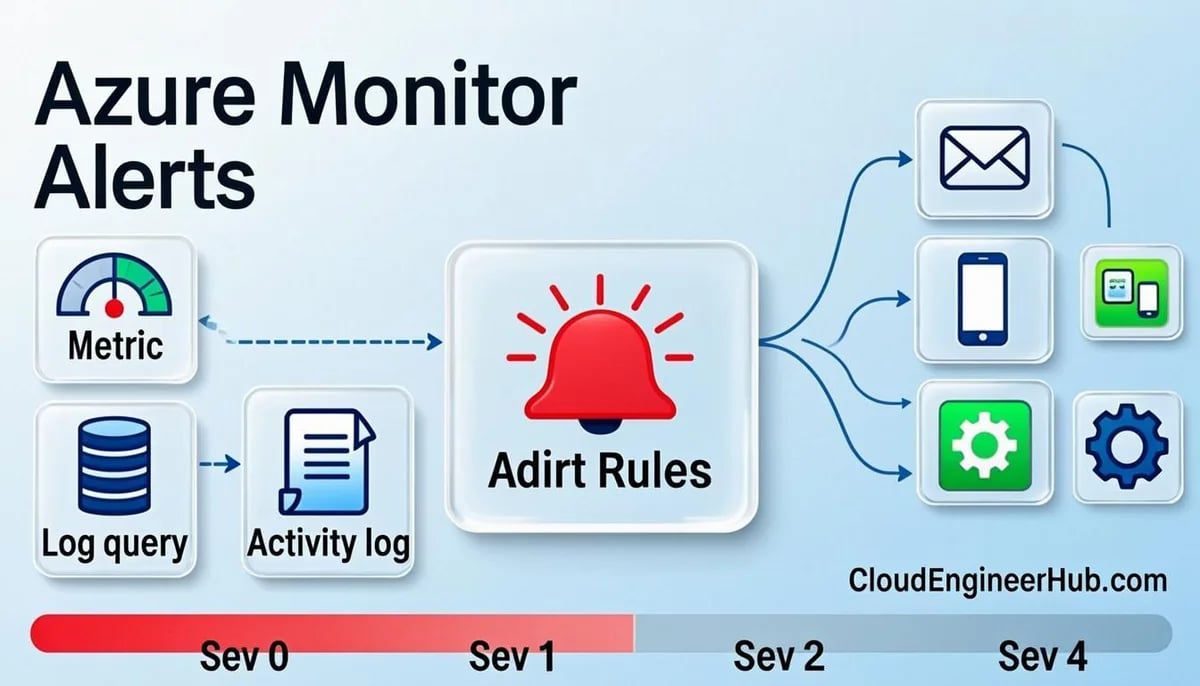
Metric alerts (near-real-time, ~1-5 min latency). Evaluate a numeric signal — CPU %, HTTP 5xx rate, DTU consumption — on a fixed cadence. Support dynamic thresholds (machine-learned seasonality), multi-dimension splitting, and multi-resource scope. First choice whenever a metric exists.
Log alerts (scheduled query rules). Run a KQL query on Log Analytics on an interval; fire when rows/results breach a threshold. Use for anything a metric can't express: "more than 5 distinct users hit error code 50126 in 15 minutes", "backup job failed in the last 24h".
Activity log alerts. Fire when a control-plane event happens: VM deleted, NSG changed, key vault policy modified. These are your security and change-detection tripwires.
All three route through Action Groups (the notification bundle: email, SMS, webhook, Logic App, ITSM, Azure Functions) and can be reshaped by Alert Processing Rules (suppress during maintenance windows, remap severities).
State handling matters: metric and log alerts are stateful by default — they fire once on breach and resolve when healthy (you get a Resolved notification). Legacy stateless behavior fires every evaluation window, which is how teams get 400 emails at 2 a.m.
Step-by-Step Implementation
1. Define the severity model before creating anything
Severity
Meaning
Routing
Sev 0
Customer-impacting outage
Page (SMS/voice) — 24/7
Sev 1
Degradation, imminent failure risk
Page on-call during hours, email 24/7
Sev 2
Problem building (trend will breach)
Email team channel
Sev 3/4
Informational, hygiene
Weekly review or dashboard
Every alert you create gets a severity from this table — and a documented runbook link.
For multi-VM fleets, drop -TargetResourceId and use -TargetResourceScope with the resource-group ID plus -TargetResourceType "Microsoft.Compute/virtualMachines" — one rule covers every VM, split alerts per dimension.
4. Deploy the log-alert workhorses
Scheduled query alerts are where engineering judgment lives. Two patterns to standardize:
# Pattern B: absence-of-event detection (backup didn't run)$absence = @"
AzureBackupJobs
| where JobOperation == "Backup" and TimeGenerated > ago(24h)
| where JobStatus !in ("Completed","CompletedWithWarnings")
| summarize Failures = count() by JobOperation
"@
$C2 = New-AzScheduledQueryRuleCriteria -Query$absence -TimeAggregation Count -Operator GreaterThan -Threshold0# Wire via New-AzScheduledQueryRule as in Pattern A, Severity 1.# Expected output: fires when any backup job ends in a non-success state in 24h.
5. Tripwire the control plane
PowerShell
1
2
3
4
5
$scope = "/subscriptions/<sub>"$cond = New-AzActivityLogAlertCondition -Field"operationName" -Equals"Microsoft.Compute/virtualMachines/delete"
New-AzActivityLogAlert -ResourceGroupName$rg -Name"vm-deleted" -Location"global" `
-Scope$scope -Condition$cond -Action (Get-AzActionGroup -ResourceGroupName$rg -Name"ag-prod-core").Id -Severity1# Expected output: activityLogAlert resource; fires on any VM deletion in the subscription.
Add companions for Microsoft.Network/networkSecurityGroups/securityRules/write and Microsoft.KeyVault/vaults/accessPolicies/write — the three changes you never want to learn about from a customer.
6. Shape delivery with alert processing rules
Suppress Sev 3/4 during maintenance and remap noisy legacy severities:
PowerShell
1
2
3
4
5
6
New-AzAlertProcessingRule -ResourceGroupName$rg -Name"apr-maintenance-suppress" `
-Location"global" -RemoveAllActionGroups `
-Scope"/subscriptions/<sub>/resourceGroups/rg-app-prod" `
-Schedule (New-AzAlertProcessingRuleSchedule -StartDateTime"2025-01-15T00:00:00Z" -EndDateTime"2025-01-15T04:00:00Z" -TimeZone"UTC")
# Expected output: alertProcessingRule that strips notifications in the window —# incidents still open in Azure Monitor, but nobody gets paged for planned work.
Configuration Deep Dive
Window vs frequency: window is how much data each evaluation sees; frequency is how often it checks. 5-min frequency with 15-min window is the standard heartbeat; don't run 1-min frequencies on log alerts — ingestion lag (2-8 min) makes them liars.
Stateful vs stateless: keep stateful (default) so a persistent breach alerts once and resolves. Use -AutoMitigate on metric rules to get automatic resolution notifications.
Dynamic thresholds need ~1 week of history to learn weekly seasonality; expect tuning churn in week one. Use Medium sensitivity for user-facing tiers, Low for background systems.
Action group design: one "core" group for everything, one "paging" group for Sev 0/1, plus per-team groups only when ownership truly differs. Fewer groups = fewer forgotten subscriptions.
Cost guardrails: log alerts are billed per query execution — a 1-min frequency × 50 rules × 31 days adds up. Metric alerts: the first 1,000 evaluations/month per rule set are effectively free-tier; consolidation via multi-resource scope saves real money.
Real-World Enterprise Scenario
A SaaS provider with 120 VMs had 340 alerts — every VM had four static CPU/disk/network rules at fixed 80% thresholds. On-call received ~200 emails daily and had tuned email filters to auto-archive them. When a real outage hit (SQL DTU saturation, Sev 0 signal buried in noise), detection took 47 minutes.
The rebuild: fleet-wide dynamic-threshold rules via multi-resource scope (340 rules → 12), log alerts only for absence/failure semantics (backup, jobs, sign-in attacks), activity-log tripwires for infrastructure changes, and the severity table above wired to one paging group. Post-rebuild: ~4 pages a week, 96% actionable, and the next real degradation was detected — and auto-resolved — by the dynamic rules before the customer's status page noticed.
Visual Walkthrough
Consent, paging and Retry-After: the difference between a script and a liability.
Interactive FlowGraph API Call — Token to Throttle-Safe Script6/6
1
App registered + consented
Application or delegated permission approved (least privilege).
Stateless rule or stateful rule with tiny window re-triggering
Use stateful + -AutoMitigate; widen window; add processing-rule suppression
Webhook payload unparsable in Logic App
Vendor-specific schema
Enable -UseCommonAlertSchema on the receiver and re-parse
Activity alert fires on reads/notifications
Scope too broad, condition field wrong
Pin operationName + status ("Succeeded"/"Failed") explicitly
Common Errors
"The alert rule is in a failed state: resource not found" — the target resource was moved/deleted; the rule still points at the old ID. Re-create with the new resource ID.
400: scheduledQueryRules query exceeds limits — KQL too complex or result set > 64MB; pre-aggregate with summarize and filter columns.
Action group throttled — SMS/voice receivers cap per subscription; use email/webhook for volume and SMS only for paging tiers.
"Dimension value not found" — splitting on a dimension that disappeared (renamed VM tag); update the rule's dimension list after resource renames.
Best Practices
Alerts map to actions — if nobody knows what to do when it fires, delete it or move it to a dashboard.
Prefer metrics for symptoms, logs for semantics — CPU/memory from metrics; "backup didn't run" only logs can say.
One shared action-group taxonomy documented in the repo next to the alert definitions.
Deploy alerts as code (this Az PowerShell, or Bicep) — reviewable, portable, and you can't alert on what you can't rebuild.
Review alert volume monthly: rules that fired >10 times with no action get retuned or demoted in severity.
Add the runbook URL to every alert description — the responder's first click should land on the fix.
Security Considerations
Route activity-log alerts (deletes, policy changes, key-vault edits) to a security-owned channel — they're your detection layer for accidental and malicious change.
Alert rule definitions reveal infrastructure topology; grant Monitoring Contributor narrowly, use Monitoring Reader for dashboards.
Webhook URLs in action groups are secrets — rotate Logic App SAS/keys on a schedule and prefer managed-identity-based Event Grid where possible.
Keep .azure CLI/PS auth on interactive accounts with MFA enforced via Conditional Access — alerting infrastructure is an attack path into subscriptions.
FAQ
Q: How fast do alerts actually fire?
A: Metric alerts: 1-5 minutes. Log alerts: evaluation cadence + ingestion lag (typically 5-15 minutes end-to-end). Design SLAs accordingly — don't promise 1-minute detection on log queries.
Q: Can one rule cover an entire subscription?
A: Yes — metric rules support multi-resource scope by type (all VMs, all storage accounts), which is both cheaper and operationally simpler than per-resource rules.
Q: How do I stop alert fatigue without losing coverage?
A: Consolidate to dynamic thresholds, enforce the severity table, suppress during maintenance with processing rules, and delete rules that page without action. Coverage comes from the right 30 rules, not 300.
Q: Log alert fired — how do I see the rows that matched?
A: The alert payload includes the result set (or a link); also embed the query in the runbook so responders rerun it directly in the workspace with | take 100 for context.
Q: What's the recommended frequency/window for log alerts?
A: 5-min frequency with a 15-min window for most; 15/30 for noisy low-severity signals. Faster cadences burn money and multiply ingestion-lag false positives.
Conclusion
A mature Azure Monitor deployment is a small, sharp instrument: three alert families used for what they're best at, a severity model that routes sleep appropriately, and everything deployed as code. Build the action groups first, standardize the severity table, replace per-VM static rules with fleet-level dynamic thresholds, and tripwire the control plane. Your on-call rotation will notice the difference in the first week.



Comments
0No comments yet — be the first to share your thoughts.